Plan your whole wedding in one calm, connected spreadsheet
Enter your date, budget and names once. Your checklist dates itself, your budget adds itself up, and your countdown, RSVP and meal counts update on their own.
- Instant download
- Google Sheets & Excel
- 30-day file-works promise
- Secure checkout
Less juggling, more enjoying being engaged
Most wedding templates are pretty grids you fill in by hand. This one is connected, so the hard part is done for you.
Set up once, then it runs itself
Fill in the Start Here tab with your names, date, budget and guest count. The other tabs pick those details up automatically.
Know where every dollar is going
Estimated vs. actual, deposits, due dates and balances for up to 100 budget items, plus a Who Pays tab for family contributions.
Always know what to do next
73 starter tasks, each due date worked out backwards from your wedding day. Anything overdue turns pink, so nothing slips.
Plan it together
Open it in Google Sheets and share it with your partner, so you can both update it from your own phone or laptop.
A tab for every part of the plan
Here's what you'll be working with. Tap any image to zoom in.
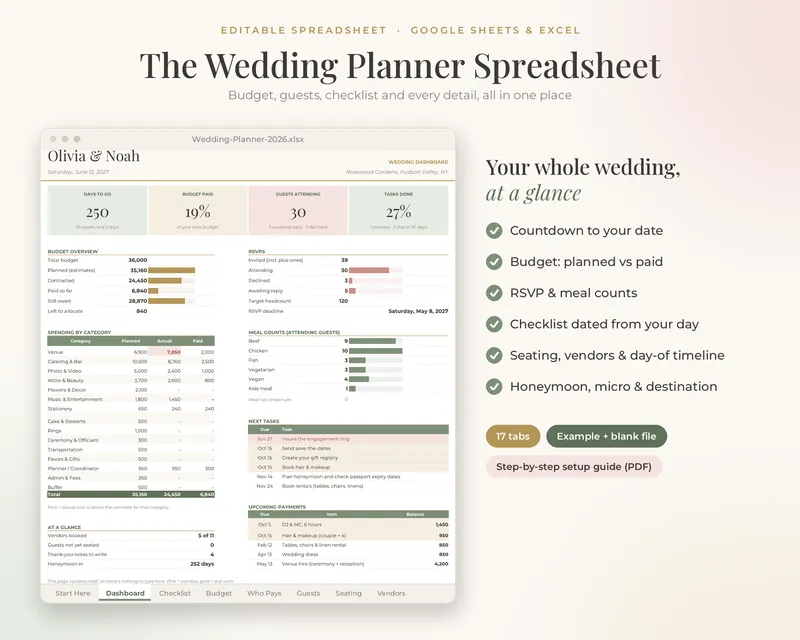
Your whole wedding, at a glance
The dashboard updates itself as you plan. There's nothing to type here, just answers.
- Days-to-go countdown
- Budget paid vs. planned
- RSVP and meal counts for your caterer
- Tasks done, next tasks and upcoming payments
A wedding budget that does the math
Track every quote, deposit and balance, and see exactly who has pledged what, and what has actually been paid.
- Estimated vs. actual for up to 100 items
- Deposits, due dates and balance owed
- Split costs between you, each family and anyone else contributing
- Pink flags when a category goes over
Guests, RSVPs and seating, all connected
Keep everyone in one list, then seat them table by table. Headcounts and meal totals update automatically.
- Up to 300 guests with addresses and plus-ones
- Meal choices and dietary needs
- 20-table seating chart
- Flags for duplicate names and over-full tables
A checklist that dates itself
Not sure what to do when? Every task gets a due date counted back from your wedding day, from booking the venue to mailing thank-you notes.
- 73 starter tasks you can edit
- Due dates calculated from your date
- Overdue tasks turn pink
- Progress shows on the dashboard
Vendors compared, wedding day sorted
Compare quotes side by side, then build a day-of schedule that recalculates when you change a time.
- Vendor quotes with ratings, pros and cons
- Venue comparison priced for your guest count
- Day-of timeline that updates itself
- Day-of contacts and an emergency kit list
Small, far away, or heading off after
Dedicated tabs for the way you're celebrating, plus the trip that comes after.
- Honeymoon budget, itinerary and packing list
- One-page micro wedding & elopement planner
- Destination room blocks, guest travel and transfers
- Welcome events and destination to-dos
Instant download · Google Sheets & Excel
Everything is connected
Sixteen planning tabs plus a Lists tab for your dropdown options, all linked together.
- Start HereEnter your names, date, budget, currency and guest count once.
- DashboardCountdown, budget paid vs. planned, RSVP and meal counts, tasks done, next tasks and upcoming payments.
- Checklist73 starter tasks, each dated back from your wedding day. Overdue tasks turn pink.
- Budget & PaymentsEstimated vs. actual, deposits, due dates, balance owed and payment status for up to 100 items.
- Who PaysSplit costs between you, each family and other contributors, and compare pledged vs. paid.
- Guest List & RSVPsUp to 300 guests with addresses, plus-ones, meal choices, dietary needs, table and gift lookups.
- Seating Chart20 tables, with flags for duplicate names and over-full tables.
- VendorsCompare quotes side by side, with ratings, pros and cons, and a decision for each vendor.
- VenuesCompare venues, with the estimated total cost worked out for your guest count.
- Wedding PartyRoles, contacts, attire sizes, duties and thank-you gifts.
- Day-Of TimelineA schedule that recalculates when you change a duration, plus day-of contacts and an emergency kit list.
- Music & PhotosSongs for key moments, must-play and do-not-play lists, and a 22-shot photo list.
- Gifts & Thank-YousLog gifts and track thank-you notes. Status also shows on the guest list.
- HoneymoonTrip budget, day-by-day itinerary, documents and packing list.
- Micro Wedding & ElopementA simple one-page planner for small weddings.
- Destination WeddingHotel room blocks, guest travel and transfers, welcome events and destination to-dos.
- ListsEdit every dropdown, including categories, meals, roles and currencies.
Everything you need, in one download
- Wedding planner, example editionFilled with sample data so you can see exactly how every tab works.
- Wedding planner, blank editionThe same 17-tab planner, clean and ready for your details.
- 12-page setup guide (PDF)Step-by-step instructions for Google Sheets and Excel.
- Instant download
- Google Sheets & Excel
- 30-day file-works promise
- Secure checkout
- Google Sheets (free with a Google account) or Microsoft Excel 2016 / Microsoft 365 or newer
- Easiest to set up on a computer; use the Google Sheets or Excel mobile apps for updates on the go
- Apple Numbers isn't supported
- Any currency: choose yours on the Start Here tab
Planning in three easy steps
- Check out securelyPay once. No subscription, no account to create on this site.
- Download instantlyYour download link appears right after payment and is emailed to you as well.
- Open & fill in Start HereUpload to Google Drive or open in Excel, add your details, and the planner does the rest.
Our help-first, file-works promise
If your planner won't open or isn't working the way we describe, email us within 30 days. A real person will help you get it working, usually within 2 business days. If we can't fix the problem, you'll get a full refund.
Because this is an instant digital download, we can't offer change-of-mind refunds. Read the full refund policy.
Planning everything? Meet the Complete Wedding Planning Bundle
The Wedding Planner Spreadsheet together with our companion planners for the budget, guest list and seating, the wedding party, the day itself and the honeymoon, all in the same sage, blush and gold design, at one bundle price.
Questions, answered
How do I get my planner after I buy?
Right after checkout you'll get instant access to your download, plus an email with your download link. Nothing is shipped.
Do I need Microsoft Excel?
No. The planner works in Google Sheets, which is free with any Google account. It also works in Microsoft Excel 2016, Microsoft 365 or newer.
Does it work on a Mac, iPad or phone?
Yes on a Mac, using Google Sheets in your browser or Excel for Mac. Setup is easiest on a computer; after that you can update it on the go with the Google Sheets or Excel mobile apps. Apple Numbers isn't supported.
Can my partner and I both use it?
Yes. Upload it to Google Drive, open it in Google Sheets and share it with your partner (or the parent, friend or planner helping you), and you can both edit it live.
I'm not a spreadsheet person. Will I manage?
Yes. All the formulas are already built, so you just type your details. The example edition shows every tab filled in, and the 12-page guide walks you through setup. If you get stuck, email us and we'll help.
Can I change the categories, tasks and timeline?
Yes. Edit every dropdown (budget categories, meals, roles and currencies) on the Lists tab, and adjust the starter tasks, budget lines and day-of timeline to fit your wedding.
What currency does it use?
Any currency. Pick yours on the Start Here tab and the whole planner follows.
What if it doesn't work for me?
Email us and we'll help you get it working. If we can't fix a problem with the file, you'll get a full refund. See the guarantee below and our refund policy for details.
Can I share or resell the files?
The planner is licensed for your own personal use (sharing it with your partner and the people helping plan your wedding is fine). Please don't resell, redistribute or post the files online.
Your wedding, organized in one place
Seventeen connected tabs, example and blank editions, and a step-by-step guide. Download it in seconds and start planning tonight.
- Instant download
- Google Sheets & Excel
- 30-day file-works promise
- Secure checkout